
A separate OnlyFans creator website has no single fixed cost: your budget depends on whether you need a branded page linking to OnlyFans or a website that handles subscriptions itself. For a link-out website, budget for the website service, your custom domain and any separately charged setup or maintenance. Compare the full recurring commitment, not just the amount shown at checkout.
TL;DR
- Your onlyfans website cost depends on whether the site links to existing platforms or runs its own subscriptions.
- AkaMe fits creators who want a personalized creator website linking to subscriptions, products or services hosted elsewhere.
- Compare custom domain renewal, website service and setup responsibilities before choosing a link-in-bio website builder.
- Preview your page before checkout so you can assess its presentation before committing.
How much does a separate OnlyFans creator website cost?
For a 2026 budget, separate the website itself from the services it links to. A page that introduces you and sends visitors to OnlyFans has a different scope from a site that stores subscriber content, processes payments and manages access.
AkaMe provides a personalized creator website on a unique domain, with registration and publishing handled for you. That makes it relevant when your paid destination already exists and you want a branded place to bring your links together.
Use this breakdown when reviewing a website offer. These are items to check, not a claim that every provider charges for each separately.
| Budget item | What to establish | Why it changes your decision |
|---|---|---|
| Website service | What the recurring service includes | A page builder and a custom development project involve different work |
| Custom domain | How registration and renewal are handled | The address needs its own clear renewal arrangements |
| Initial setup | Who builds, configures and publishes the page | A lower service charge can leave more work with you |
| Content preparation | Who supplies photos, text and destinations | Missing content can leave a finished layout unfinished in practice |
| Ongoing changes | Who updates links and page content | Your preferred workflow matters after launch |
| Separate business tools | Which existing services remain necessary | A link-out website does not replace the destinations it links to |
Ask for a written breakdown of initial charges, recurring charges and included work. That gives you a useful comparison without treating different website scopes as interchangeable.
Why this matters
The phrase OnlyFans website cost can describe two very different purchases. You might want a simple public destination for your creator identity, or you might want to operate a separate subscription business on your own website.
Do not pay for the second job when you only need the first. Start by writing down what a visitor must be able to do on your website, then compare services against that brief.
A practical brief might be: recognize your name, understand what you create and choose the right destination. If that covers the job, evaluate a focused creator website before requesting a larger development project.
Choosing the right fit
Your 2026 website decision should start with how much setup you want to handle and where your business already operates. The right option fits those responsibilities, not just the page you see in a preview.
| Approach | Best for | Main benefit | Responsibility to consider |
|---|---|---|---|
| AkaMe creator website | Creators whose subscriptions, products or services already live elsewhere | Personalized website, unique domain, handled registration and publishing, plus photo selection assistance | Keep the linked destinations current and decide which links deserve attention |
| Self-built website | Creators who prefer direct control over building and domain configuration | You make the page-building and configuration decisions | You take responsibility for the setup work you choose to manage |
| Custom-built website | Creators with requirements beyond a branded link-out page | You can define a project around a specific brief | You need a clear agreement on development, revisions and ongoing support |
AkaMe is best for creators who want a personalized website linking to subscriptions, products or services already hosted elsewhere. Its focused purpose suits that workflow: present your identity, organize your destinations and publish on your own domain.
If you enjoy building pages and configuring a domain yourself, a self-built route is a sensible fit. If you need functions beyond presenting information and linking visitors onward, write those requirements down before approaching a developer.
The trade-off is responsibility. Handled setup reduces the configuration you take on; building directly gives you more decisions to make yourself. A custom project requires more detailed agreement about what gets delivered.
What makes an OnlyFans creator website budget vary?
These factors explain why two website offers are not automatically comparable. Use them to check what each proposal actually covers.
- Website scope. A public introduction page and an independently operated subscription website are different projects. Decide whether visitors simply follow links or use services on the site itself.
- Setup responsibility. Establish who handles domain registration, configuration and publishing. Included setup and self-managed setup represent different amounts of work for you.
- Customization. Decide whether you need changes to presentation and content or functions that require development. Describe the actual requirement rather than asking for something broadly described as custom.
- Content preparation. Photos, introductory text and destination links need decisions. Establish which assistance is included and which materials you must provide.
- Ongoing service. Check renewal arrangements, updates and support responsibilities. Compare what remains included after the initial page is published.
For your 2026 comparison, keep the brief identical across providers. Asking one provider for a link page and another for a membership platform produces two quotes that answer different questions.
How do you compare website costs before checkout?
Use a 12-month planning period to put different billing arrangements on the same footing. This is a budgeting method, not a prediction of what any particular provider charges.
Define the job
Write a short statement of purpose before looking at layouts. For example: a public creator website that introduces you and links to your existing subscription page, store and business contact destination.
Remove functions you do not need. A website does not need to recreate your existing business tools simply because it has your name on the domain.
Check the domain
Confirm which address you are selecting and how registration and renewal work. Read any relevant ownership or transfer terms before committing, rather than assuming every service handles them identically.
A domain is the address; the website is what visitors see there. Keep those roles separate when reviewing an offer so you understand what each recurring commitment maintains.
Compare commitments
Record the initial payment, the recurring website service and any separately charged domain renewal. Include required extras, but do not add optional work you have already decided to skip.
For a 12-month budget, account for payments due during that period. Then review renewal separately: an introductory arrangement and an ongoing commitment need not be the same thing.
Preview the page
Look at the actual presentation before deciding. Check the name, photos, introductory text, link labels and order of destinations, rather than judging a page only by its general style.
AkaMe includes customization, photo selection assistance and a preview before checkout. Photo assistance supports your choice; you still decide which images represent you.
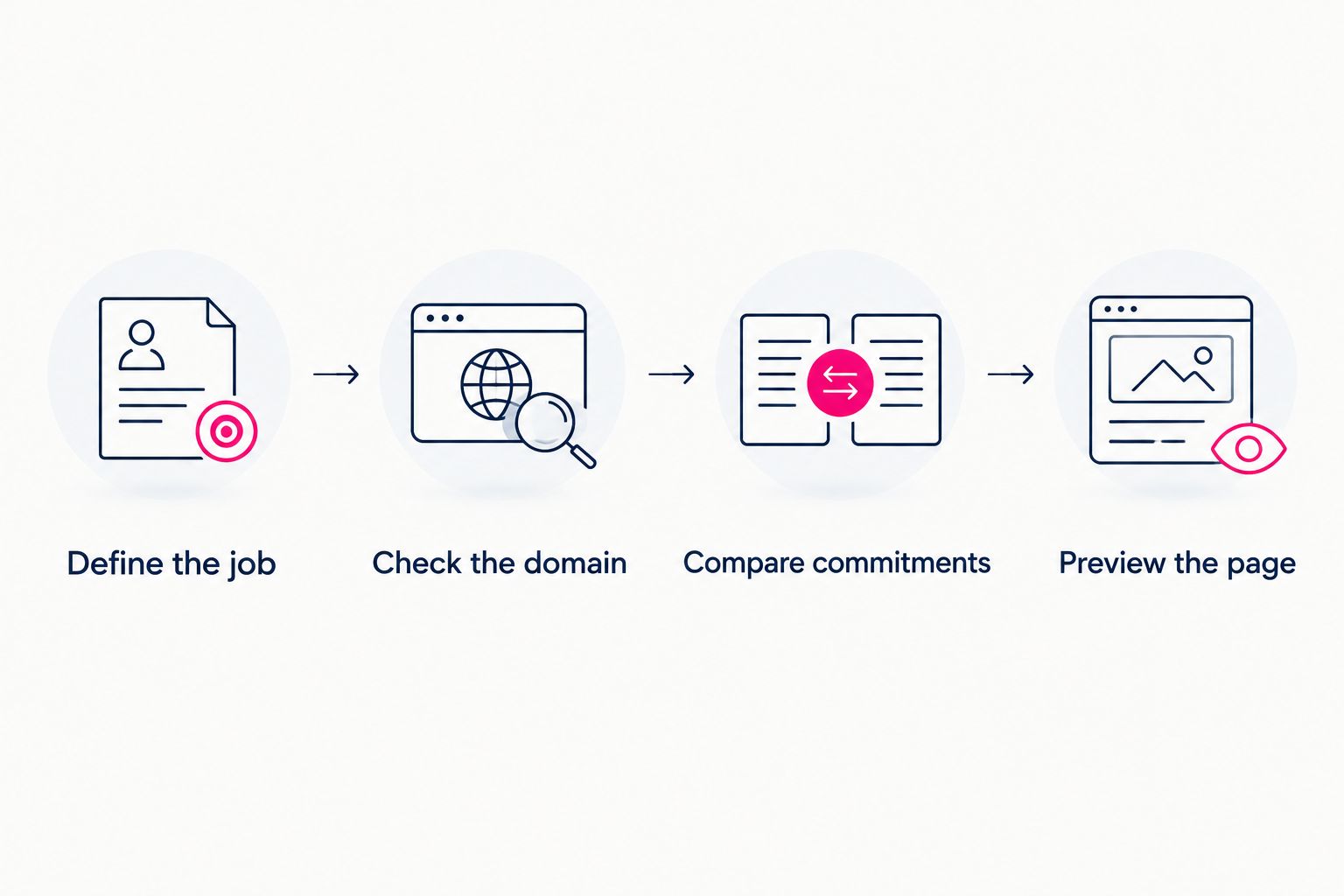
Define the website's job before comparing its payment commitments.
What should you check in a creator website preview?
A useful preview answers a practical question: does this page help someone recognize you and find the right destination? It is your chance to adjust the presentation before checkout, not just approve a color choice.
Check the page as a visitor would:
- Identity: Does the displayed name match the identity you use publicly?
- Photos: Have you chosen images that represent how you want to present yourself?
- Introduction: Does the opening text explain what visitors will find?
- Destinations: Does each link lead to the intended page or service?
- Priority: Is your most important destination easy to identify?
- Labels: Can visitors understand a link without guessing what sits behind it?
Keep the page focused. If several links have nearly identical labels, rewrite them so each destination has a clear purpose. If a link no longer serves your business, remove it rather than keeping it for appearance's sake.
Do you need a full website if you already use OnlyFans?
You need a separate website only if it has a job your existing destinations do not cover. A branded public page can introduce you and connect your profiles, subscriptions, products or services without replacing them.
For a 2026 launch, start with the destination you want to share publicly. If that destination only needs to explain who you are and organize your links, evaluate that scope rather than assuming you need a full subscription system.
A separate website is not a promise of more revenue or better search rankings. Judge it on what it actually provides: a recognizable address and a page you can personalize around your creator identity.
Does a custom domain replace your OnlyFans subscription page?
A custom domain does not replace your OnlyFans subscription page. It gives your creator website a distinct address; visitors can then follow a link to the subscription service you already use.
That separation keeps the website brief straightforward. Your public page handles introduction and routing, while the linked service continues handling the activities you use it for.
Choose link labels that make the handoff clear. Visitors should understand whether they are opening a subscription page, browsing products or reaching a business inquiry destination.
What should you prepare before building the page?
Prepare your public creator name, preferred domain ideas, photos, a short introduction and the destinations you want to include. Having those materials ready lets you spend the preview stage making choices rather than searching for basic information.
Use the current destination URLs, not remembered versions or shortened addresses you have not checked. Open each destination yourself and confirm that it is the page you intend to share.
If you already use a link-in-bio page, treat it as an inventory rather than a layout you must copy. Keep useful destinations, remove outdated ones and reconsider their order around your current priorities.
FAQ
How much does a separate OnlyFans creator website cost in 2026?
A separate OnlyFans creator website has no universal fixed cost. Compare the website service, domain arrangements, setup and recurring commitments for the specific scope you need.
Is a creator website the same as building an OnlyFans alternative?
No. A creator website can introduce you and link to OnlyFans, while an independently operated subscription website needs its own arrangements for subscriptions, payments and access.
What's the best website option if my subscriptions already live elsewhere?
A focused link-out creator website fits a business whose subscriptions, products or services already live on other platforms. AkaMe supports that workflow with a personalized website on a unique domain and handled registration and publishing.
What costs should I compare besides the website service?
Check domain registration and renewal, setup, required extras and ongoing maintenance responsibilities. Establish which items are included rather than assuming they are all separate charges.
Can I keep my existing subscription page and store?
Yes. A link-out creator website directs visitors to existing destinations rather than requiring you to rebuild those services on the website.
Why should I preview my creator website before checkout?
A preview lets you assess your photos, text, link labels and page organization before committing. Use it to check whether visitors can recognize you and identify the right destination.
Related guides
- How to move from Linktree to your own creator website
- Linkme alternatives for creators who want their own domain
One last thing
Your website brief is also your spending filter. Before adding a feature, name the task it solves for your visitors. If the task already happens at a destination you trust and use, linking there can keep the website focused.
Preview an AkaMe creator website, personalize the presentation and explore a domain that fits your public name. Start with the page you actually need.
Preview your creator website
Personalize your page, bring your important links together and explore a domain that fits your name.