
Your OnlyFans creator website needs an age gate when the rules that apply to its public content require one—not simply because it links to OnlyFans. For onlyfans website age verification in 2026, assess the page visitors can see before entering another platform; a confirmation button is not the same as verifying someone’s age.
TL;DR
- OnlyFans website age verification depends on public content and applicable rules, not just the destination of your links.
- A confirmation button records a visitor’s claim; it does not independently establish age.
- AkaMe fits creators who want a custom-domain creator website connecting their existing platforms.
- Check the public page, choose an appropriate access method, and test the visitor journey before publishing.
Does your OnlyFans creator website need an age gate?
Assess your creator website separately from your OnlyFans account. A visitor reaches your public website before encountering any checks on a linked platform. Those later checks do not control what your own page has already displayed.
If you use a personalized creator website from AkaMe, make that assessment before choosing the public photos, descriptions and destinations. The domain makes the destination yours to present; it does not determine which age-assurance rules apply.
Start by separating these different approaches. They answer different questions and should not be treated as interchangeable.
| Approach | What it establishes | Best for | Main limitation |
|---|---|---|---|
| Age confirmation button | The visitor says they meet an age threshold | Communicating an age condition where a declaration is appropriate | Does not independently establish age |
| Date-of-birth entry | The visitor supplies a birth date | Workflows requiring a stated date of birth | A visitor can enter an inaccurate date |
| Age-assurance check | An assessment of whether the visitor meets an age threshold | Situations requiring more than a declaration | Suitability depends on the method, implementation and applicable requirements |
| Linked platform checks | Access conditions for the destination platform | Controlling access within that platform | Do not restrict content already visible on your website |
A gate is an interface. Verification is a process. Choose the process first, then make sure the interface accurately describes it.
Why this matters
Your creator website introduces you, presents your work and helps visitors choose their next step. Its public content needs a deliberate boundary, whether you publish a simple profile or a more detailed creator page.
The practical question in 2026 is not whether a warning looks responsible. It is whether your public page, access controls and wording match the requirements that actually apply. A prominent button cannot fix a mismatch between those things.
Keep the review focused. You do not need to turn a link-in-bio website into a duplicate subscription platform to give visitors a useful destination.
A confirmation gate: a declaration, not proof
An age confirmation gate asks visitors to confirm that they meet a stated threshold before continuing. It communicates a condition clearly. That is its useful function.
Its limitation is equally clear: pressing a button does not independently establish the visitor’s age. Do not describe a confirmation-only screen as verified access or suggest it provides the same assurance as a separate age check.
If a declaration is appropriate for your situation, explain it plainly and give visitors a clear way to leave. Avoid wording that suggests the website has checked documents, identity or age when it has not.
Also check the implementation. A warning displayed over content is not necessarily an access control; the content beneath it might already have loaded. Ask your provider what the gate actually prevents visitors from accessing.
Date-of-birth entry: more information, still self-reported
A date-of-birth form asks for a more specific answer than a confirmation button. It can support a workflow that needs a stated birth date, but the information remains self-reported unless another process checks it.
A longer form is not automatically stronger verification. The important distinction is how the answer is established, not how many fields the visitor completes.
Before adding a birth-date field, decide why you need that information and whether you need to retain it. Do not collect a full birth date just to make the page look more formal.
Describe the process accurately in visitor-facing language. If you only ask someone to enter a date, say that; reserve verification language for a process that supports it.
Age assurance: choose the method against the requirement
Age assurance covers methods used to assess whether someone meets an age threshold. Verification and estimation are different approaches within that wider category, and their suitability depends on the requirement you need to meet.
If your website requires stronger assurance, first establish what the relevant rules expect. Then evaluate whether a proposed service and its implementation meet that expectation. A provider’s general description is not a substitute for checking the actual workflow.
Ask practical questions about what visitors submit, what the website receives and what information is retained. A result indicating that a visitor meets the threshold is different from sending identity documents directly to the creator.
For a 2026 launch, check current requirements before selecting the method. Do not choose an attractive gate design first and assume its underlying checks will be sufficient.
What determines the right approach?
The right approach depends on the page and the rules governing it. Review these factors together rather than treating the presence of an OnlyFans link as the entire decision.
- Public content: Identify what a visitor can see immediately, including images, descriptions and previews. Review the actual material, not just the page’s category label.
- Audience location: Age-assurance obligations differ by jurisdiction. Establish which locations your compliance review needs to cover.
- Website function: Distinguish a public introduction linking elsewhere from a website that hosts restricted material itself.
- Required assurance: Determine whether a declaration is appropriate or whether the relevant requirement calls for a stronger assessment.
- Technical implementation: Check when content loads, which routes are restricted and whether direct links bypass the intended control.
- Personal information: Understand what the method collects, who processes it and how it is handled. Choose information collection deliberately.
These factors explain why a universal instruction to add a checkbox is inadequate. They also explain why collecting identity documents by default is not a sensible starting point.
How do you review your creator website before publishing?
Use 4 checkpoints to turn the question into a publishing decision. Keep the review attached to the page you plan to publish, rather than a generic description of your business.
Review public content
Open the page as a visitor who is not signed in. List the images, text, previews and other material available before any interaction.
Include direct access to individual pages and media where relevant. A homepage warning does not describe the whole visitor experience if another route opens the same material without it.
Decide what belongs on the public introduction and what belongs at the linked destination. Keep that boundary intentional.
Check applicable rules
Establish the requirements that apply to the content, audience locations and website function you identified. When the answer needs legal interpretation, take that specific page and workflow to a qualified adviser.
Ask a precise question: what access control does this public page require? That produces a more useful decision than asking whether all creators need the same gate.
Record when you checked the answer. A decision made for a 2026 launch should reflect the requirements in force for that launch, not an undated tutorial.
Choose the method
Match the method to the requirement. Compare confirmation, self-reported birth dates and stronger assurance on what each actually establishes.
Ask the website provider about supported controls before building your publishing plan around them. Do not assume that a custom-domain feature includes an age-verification service.
Then write the visitor instructions. State what someone must do without overstating the strength of the check.
Test the journey
Test both access and exit. A visitor who cannot or does not complete the required step should receive a clear result rather than an unexplained failure.
Check the public page on a phone as well as a larger screen. Confirm that the gate’s text, controls and linked information remain usable.
Finally, test direct links and returning visits. Document what happens so the published experience matches the process you approved.
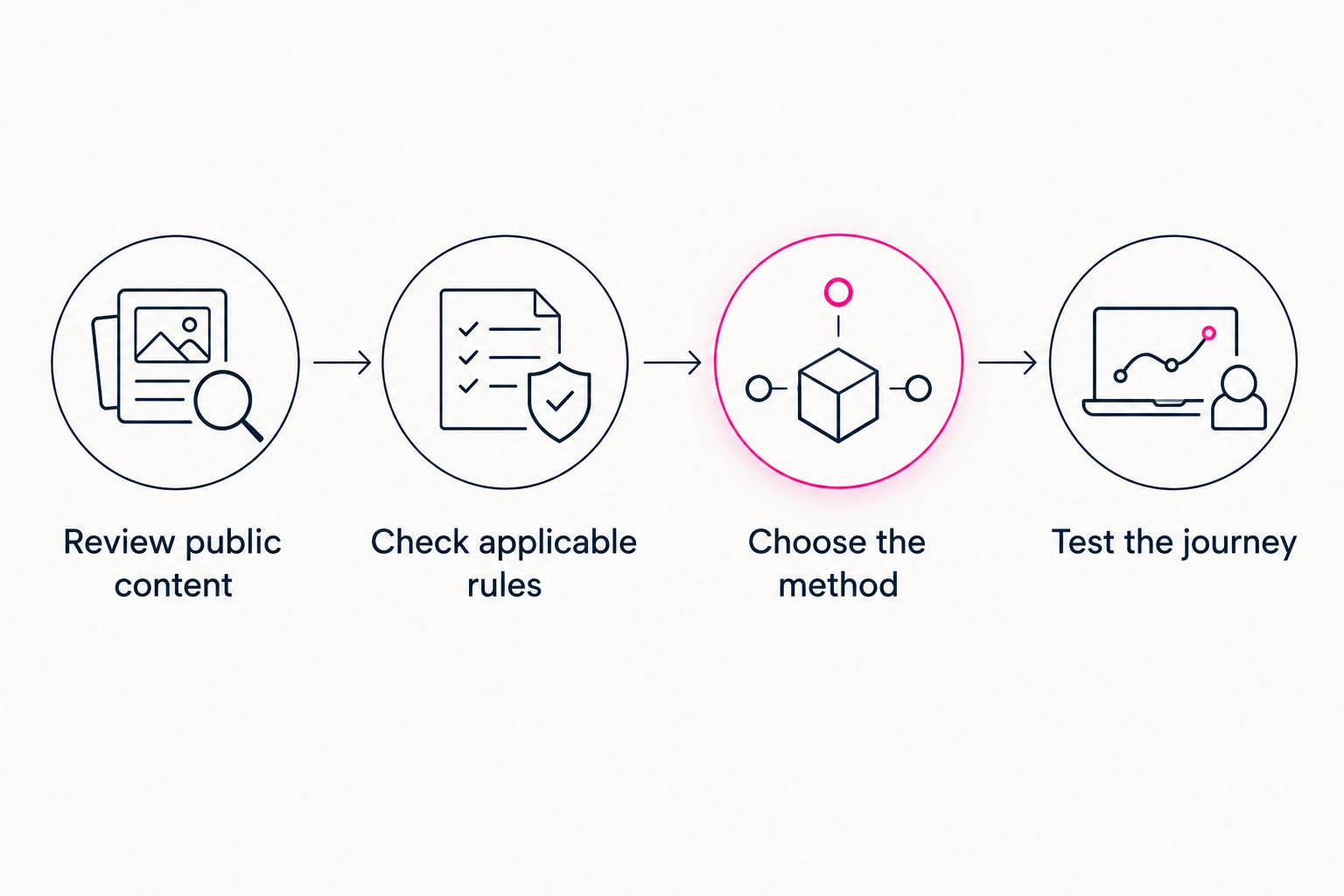
Choose an access method after reviewing the public content and applicable requirements.
The sequence matters. Reviewing the content first gives you a defined page to assess; testing last confirms that the chosen method works as intended.
What should appear on the public creator page?
Give visitors a clear introduction and a useful route to your existing destinations. Your public creator website does not need to reproduce everything available through your subscriptions, products or services.
Start with a recognizable name, a suitable profile image and a concise explanation of what visitors will find. Label destinations by purpose so people know where each link leads.
Review images individually. A photo that suits a destination platform is not automatically the right public introduction for your own website. Choose the public presentation deliberately rather than copying a profile wholesale.
For links, clarity beats vague prompts. Explain whether a destination is for subscriptions, products, bookings or another service that you actually offer. Avoid implying that visitors have already completed the destination’s access requirements.
Keep a simple publishing record containing 1 public-page inventory: the content you approved, its destinations and the access approach you selected. Update it when those elements change. This is an organizational aid, not a claim of compliance.
Choosing the right fit
AkaMe is best for creators who want a personalized website on a unique domain that links to their existing platforms. That includes OnlyFans creators whose subscriptions already live elsewhere and who want a recognizable destination for their public introduction.
The creator website brings important links together without requiring you to rebuild the business tools behind them. Registration and publishing are handled for you, with customization, photo selection assistance and a preview before checkout.
The preview gives you a practical place to review your introduction, photos and destinations together. Photo ranking assists your selection; you still decide which images represent you.
Choose the workflow against the job you need done. A branded link hub serves a different purpose from hosting restricted content or operating a dedicated age-assurance system. If access controls are part of your requirements, confirm the supported implementation before publishing.
That keeps the decision constructive: select the creator website for its public presentation and setup workflow, and assess any required access controls on their own merits.
Does OnlyFans verification cover your own website?
OnlyFans access checks do not control material already displayed on your separate website. The public page and the linked destination are different parts of the visitor journey.
Think in terms of 2 visitor journeys: someone viewing your public introduction and someone continuing to the destination platform. Assess what each journey exposes before relying on a check that happens later.
You can keep the distinction straightforward. Decide what belongs on the public page, then leave destination-specific access decisions with the destination’s process.
Does a custom domain change the age-gate decision?
A custom domain changes the address of your creator website, not the nature of its content. The assessment still depends on what the page displays and the requirements that apply.
Use the domain to give visitors a recognizable branded destination. Do not treat it as evidence that an age-assurance requirement has been met or removed.
When reviewing a 2026 creator website, assess the address, the public presentation and the access process as separate decisions. Each has a different purpose.
FAQ
Do I need age verification just because my website links to OnlyFans?
An OnlyFans link alone does not settle the age-verification question. Assess your public content, website function and applicable requirements before choosing an access method.
Is an age confirmation button the same as age verification?
An age confirmation button is a visitor’s declaration, not independent proof of age. Do not label a confirmation-only process as verified access.
Does asking for a birth date verify a visitor’s age?
A self-reported birth date does not independently verify age. The strength of the process depends on whether and how that information is checked.
Should I collect identity documents through my creator website?
Do not collect identity documents by default. First determine the required assurance method and how an appropriate provider handles visitor information.
Can I keep my creator website separate from my subscription platform?
You can use a public creator website to introduce yourself and link to an existing subscription destination. Assess the public page separately from the destination’s access process.
What should I review when I change my public photos?
Review whether the new photos change what visitors can access before any age check. Revisit the content assessment rather than assuming the earlier publishing decision still fits.
One last thing
The most useful age-gate review starts with the page, not the button. Before publishing, read your introduction and inspect every public image as someone arriving for the first time. That is the material your access decision needs to address.
Preview an AkaMe creator website, personalize the photos and links, and explore a domain that fits your name. Build the public destination you want visitors to recognize, with a clear plan for what belongs there.
Preview your creator website
Personalize your photos and links, review your page, and explore a domain for your creator name.