
Carrd is a good fit for creators who want direct control over a one-page website and domain configuration. If you want a branded destination without handling that setup yourself, a managed creator website is a better fit. The best Carrd alternative in 2026 is Akame for a personalized creator website with handled domain setup; Linktree for a straightforward link-in-bio hub.
TL;DR
- Compare Carrd alternatives by setup responsibility, custom domain needs, and how you want to present your creator website.
- Akame suits creators who want a personalized website, domain registration, and publishing handled for them.
- Linktree and Linkme belong on your shortlist when a link-in-bio page is your main requirement.
- Carrd remains a good choice when you want to build and configure the website yourself.
Why this matters
Your bio link needs to explain who you are and help visitors choose their next step. A website builder is only useful if its workflow matches the work you actually want to do.
For creators comparing Carrd alternatives in 2026, the useful distinction is building the page yourself versus having the website setup handled. That choice matters more than collecting features you have no immediate use for.
Carrd alternatives at a glance
| Tool | Best for | Main approach | Difference from Carrd |
|---|---|---|---|
| Akame | Creators wanting a personalized website with handled setup | Customizable creator website, unique domain, registration and publishing assistance | Focuses on getting your creator destination set up rather than making you configure it yourself |
| Linktree | Creators wanting a straightforward link hub | A link-in-bio page organizing destinations | Starts with the link-list workflow rather than a general one-page website |
| Linkme | Creators comparing link-in-bio options | A profile-centered destination for sharing links | Offers another link-in-bio approach to evaluate against a self-built page |
| Carrd | Creators wanting direct building control | A one-page website builder | The benchmark for a hands-on website-building workflow |
Choose the approach before comparing individual settings. A creator who enjoys arranging a page has different needs from someone who wants to supply their identity, photos, and destinations, then review a finished direction.
1. Akame: best for a personalized creator website
Best for: Creators whose subscriptions, products, or services already live on other platforms and who want a branded website linking to them.
Akame is a link-in-bio website builder built around a personalized creator website on a unique domain. Registration and publishing are handled for you, with customization, photo selection assistance, and a preview before checkout.
That makes the website a front door to your existing work. You can present your creator identity in one place while visitors continue to the platforms where they subscribe, shop, watch, or get in touch.
Where this approach helps
- A recognizable destination: Your personal domain gives you an address associated with your creator identity rather than a shared page address.
- Less setup responsibility: Domain registration and publishing are handled for you instead of becoming separate configuration tasks.
- A personalized presentation: Customization and photo selection help make the website reflect the person behind the links.
- A preview before checkout: You can assess the proposed direction before deciding whether it fits your brand.
Photo assistance supports your judgment. AI photo ranking helps with selection; it does not replace your choice about which images represent you.
Choosing the right fit
Choose Akame when your main requirement is a personalized creator website connecting existing destinations. You do not need to move your subscriptions, products, or services into a different business system just to give visitors a clearer starting point.
Choose a hands-on builder when building the page is itself part of the appeal. Carrd suits creators who want to make layout and domain-configuration decisions directly.
| Decision | Managed creator website | Carrd |
|---|---|---|
| Setup responsibility | Registration and publishing handled for the creator | Suits a hands-on building and configuration workflow |
| Presentation | Personalization with photo selection assistance | Direct control over building the page |
| Main purpose | A branded destination linking to existing platforms | A one-page website you assemble around your needs |
| Evaluation | Preview the creator website before checkout | Evaluate whether the building workflow suits you |
For your 2026 shortlist, decide whether you want to manage a website project or review a personalized result. Those are different workflows, even when both end with a page containing your links.
Verdict: Choose the managed route when you want the creator website, not the configuration project.
2. Linktree: best for a straightforward link-in-bio hub
Best for: Creators who primarily need a clear collection of destinations behind their bio link.
Linktree is a familiar link-in-bio option built around organizing links on a profile page. It belongs on your shortlist when the page's main job is to send visitors somewhere else.
Start with your actual destinations. If a profile introduction and a list of clearly labeled links describe the experience you want, evaluate that workflow before committing to a broader website builder.
Where Linktree shines
- A clear starting concept: The link-in-bio format gives you an obvious structure for presenting destinations.
- A focused brief: You can assess the page around the links visitors need rather than treating it as a full website project.
- An alternative to building from scratch: It gives you a link-centered option to compare with Carrd's website-building approach.
Choosing the right fit
The trade-off is the starting point. A link hub begins with destinations; a website-building workflow begins with the page you want to construct.
If your brief revolves around a specific website composition, compare the current editor against that brief before choosing. If your brief is simply to make important destinations easy to find, keep that simplicity central to the decision.
| Decision | Linktree | Carrd |
|---|---|---|
| Starting point | Link-in-bio profile | One-page website |
| Main job | Organize destinations | Build a page around your chosen purpose |
| Evaluation priority | Clarity of the link-hub experience | Fit of the website-building workflow |
Verdict: Choose Linktree when an organized link hub is the experience you want.
3. Linkme: best for comparing another link-in-bio workflow
Best for: Creators who want to compare profile-based link sharing before choosing a website-building route.
Linkme is another link-in-bio option to include in your comparison. Evaluate it against the same content you would put into Linktree or Carrd, rather than letting a different sample profile change your requirements.
Where Linkme fits
- Profile-first evaluation: Consider whether its approach presents your identity and destinations the way you want.
- A focused comparison: Use the same introduction, photo, and link labels to judge the experience fairly.
Choosing the right fit
Linkme belongs in a link-in-bio comparison, but that category alone does not establish whether it meets your specific domain or publishing requirements. Treat those as separate selection criteria and confirm the current offering before choosing.
Compared with Carrd, the central question remains whether you want a profile-based link destination or a website you build yourself. Choose the workflow that serves your page, not the longest feature list.
Verdict: Shortlist Linkme when you want to compare link-in-bio experiences before committing.
Why creators look beyond Carrd
Carrd does not need to be a bad fit for everyone to be the wrong fit for your next website. The reasons to explore alternatives are practical differences in responsibility and presentation.
You want setup handled
Some creators enjoy arranging a website and configuring its domain. Others want to supply the content and review the result.
If you fall into the second group, prioritize a workflow that handles registration and publishing. The managed setup versus DIY guide explains that decision in more detail.
You want a creator-focused starting point
A general one-page website can serve many purposes. Your brief might be narrower: introduce yourself, present a recognizable photo, and connect visitors with your work.
A creator-focused starting point keeps that brief central. It is a workflow preference, not evidence that a general builder cannot produce a good creator page.
You want to judge the result before committing
A preview turns an abstract feature list into something you can assess. You can ask whether the identity feels right, whether the photos work, and whether the main destination is obvious.
That is a useful selection method in 2026 because it tests your actual page concept. You are choosing a public-facing destination, not just an editor.
How to choose your creator website workflow
Use this sequence to narrow the shortlist. It separates decisions about your identity from decisions about the software.
Define your destination
Write down what the website should help visitors do. Be specific: find your subscription platform, view your work, explore a product, or make a business inquiry.
Pick a primary action. Supporting destinations can still appear, but they should not obscure the reason someone opened your page.
Choose your address
Decide whether a personal domain is part of your brief. A custom domain is a distinct address for your creator identity; the website is the destination that address opens.
Keep the name easy to recognize when you say it aloud or place it in a social bio. Do not assume domain ownership, renewal, or transfer arrangements are identical across providers; confirm those terms when selecting your domain.
Pick your workflow
Choose whether you want to build directly, manage a link hub, or review a personalized creator website with setup handled. Make that decision before comparing decorative settings.
For a 2026 launch, write a short requirement list and use it across every candidate. That prevents an appealing sample design from distracting you from the work you actually need done.
Review your page
Read the introduction, examine the photo selection, and follow each destination. Check that link labels describe what visitors will find, especially when you serve both an audience and potential business partners.
For an OnlyFans creator, for example, the website can introduce the creator brand and distinguish a subscription destination from business inquiries. The page should serve those different intentions without making visitors guess.
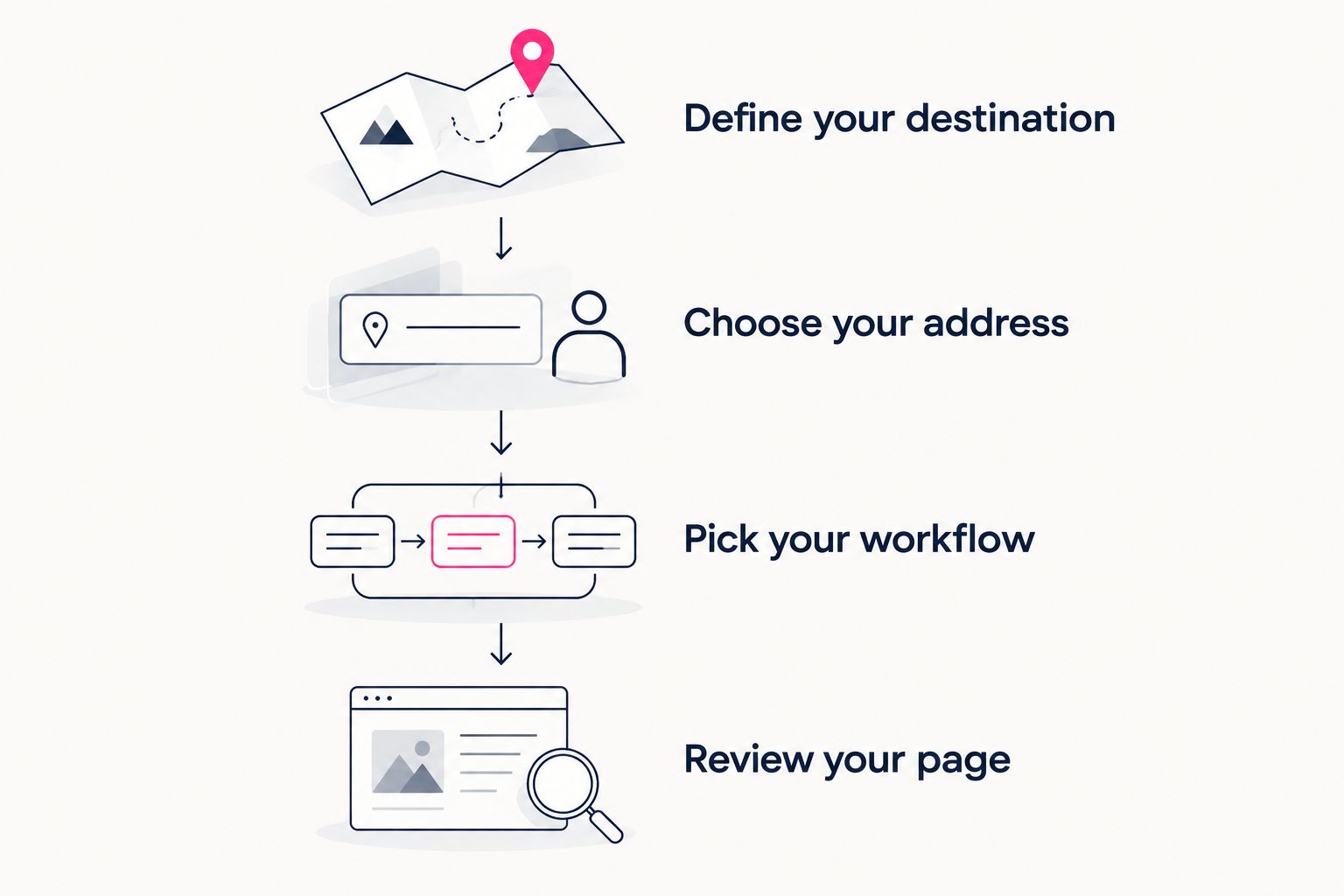
Choose the purpose and address before deciding how you want the website built.
When Carrd is still the right choice
Carrd remains a good fit when you want direct control over website building and domain configuration. If you enjoy shaping the page yourself, that involvement is a benefit rather than work to avoid.
An existing Carrd page also does not need replacing just because alternatives exist. A change makes sense when you can name a concrete improvement to your workflow or presentation.
Choose based on the responsibility you want to keep and the experience you want visitors to have. That is a more useful test than assuming a different tool automatically creates a better website.
FAQ
What's the best Carrd alternative for a creator website?
Akame is a strong choice for creators who want a personalized creator website with domain registration and publishing handled. Linktree suits a straightforward link hub, while Carrd suits creators who want to build directly.
Is a link-in-bio page the same as a creator website?
The purposes overlap, but the starting points differ. A link-in-bio page centers on destinations, while a creator website can place more emphasis on identity and presentation around those links.
Should I choose Carrd or a managed website setup?
Choose Carrd if you want direct control over building and domain configuration. Choose managed setup if you prefer to provide your content and review a personalized result.
Do I need to move my subscriptions or products to a new platform?
No, a creator website can link visitors to the platforms you already use. Its role can be to introduce your brand and organize those destinations rather than replace your business tools.
What should an OnlyFans creator put on a separate website?
Include a clear creator introduction, an appropriate photo, and clearly labeled destinations. Distinguish subscription links from business inquiries so visitors can find the right next step.
What should I check before choosing a custom domain?
Check that the name represents your creator identity and is easy to recognize. Confirm the provider's ownership, renewal, and transfer terms before choosing.
What should I look for in a creator website preview?
Check the identity, photos, link labels, and main action. A useful preview lets you judge whether the proposed page represents you and helps visitors find their destination.
One last thing
Before choosing a builder, write your main link label. If you cannot explain where it leads in a few plain words, work on that message before adding more sections.
Then preview an Akame creator website, personalize it, and explore a domain that fits your name. Start with a page you can judge, not a feature list you have to imagine.
Preview your creator website
Personalize your creator website and explore a domain that fits your name.